A New Era for Builders
How I redesigned my website and explored new territories using Opus 5.5.
Intro
In the last few days, I took some time for something that I had wanted to do for a long time: yet another redesign of my personal website (yes, the one you're reading this on). While I enjoyed the minimalist and somewhat brutalist design of the last version, it didn't feel quite right for me anymore, as it missed some playfulness and "artisanal aesthetics".
I'm not a professional designer myself, but I heard all over X, the everything app, how great Opus 5.5 supposedly is for tasks like this, so I gave it a shot.
The initial redesign
I built this redesign on the existing Laravel + Inertia + Vue site (best decision btw). I wanted to keep the content (blog and other content pages) and the general structure of the website, but give it a completely new look. The initial prompt was not a shot in the dark: I had a rough vision in mind that I wanted Opus to embody, so this is what I wrote:
Redesign my personal website.
Here's what I want: a retro-modern aesthetic that feels vintage and warm, but also futuristic and the same time.
The landing page should be centered around a shiny silver radio that looks beautiful. That radio should be part of the navigation. It should include tasteful animations while still staying clean. You may change and add pieces of text that fit the whole concept on the landing page. The same pages and features that exist now should be preserved (except for the ascii slot machine easteregg, that can go).
The backend should stay basically the same unless something has to be changed in order for the new frontend to work. Make yourself familiar with the site's current visuals and structure, a dev server is running on localhost 8000.
Go bold!
And oh boy, Opus started cooking (on max thinking). After a solid 2 hours 25 minutes and over 105 million tokens (99% of which was just cached input tho), it came back with the first version. And I was impressed! A beautiful landing page, an interactive radio with working sounds, ingenious view transitions and surprisingly little "UI slop" (other than too many eyebrows, those small labels above headings, and other minor details).
That's when I realized Opus 5.5 was a new kind of beast. To be fair, I had primarily been using OpenAI models before, so I'm not the best person to compare it to previous Anthropic models here.
Of course, there were a few bugs and things I didn't quite like. And that's perfectly fine! My prompt had lots of ambiguity. Not even the best human designer could've read my mind.
That's why I don't put a lot of value in one-shotting things. Sure, it's impressive that you can get something working without iteration, and for things you don't care that much about, that's all you need. But when you have a clear vision, lots of value is in the process of refinement.
From there on, it was lots of testing, telling Opus to fix, add or remove things. What impressed me is that even with a very vague description of an issue, it nailed it ~98% of the time, exactly the way I wanted, and elegantly.
Making it sound real
The first version of the radio already made sounds: key clicks, static when turning the tuning knob, and a little chime when landing on a station. All of them were synthesized on the fly with the Web Audio API, which was not exactly the kind of vibe I was looking for.
I wanted real samples and music to be used here, so I kicked off an agent to find audio clips and samples with public domain or Creative Commons licenses that I could use for this purpose. And it did a great job on that.
What fascinated me most was how Opus worked around the fact that it can't hear anything. It looked at waveforms and spectrograms of samples to find clean key hits, ran the talk clips through speech recognition to make sure nobody says anything weird, and hooked an analyser into the page's own audio graph to measure what actually comes out of the speakers. After it cut together all of the samples and leveled the audio, I got the first results, which were really solid.
Two of the stations needed different music, though, and none of the first picks clicked with me. So Opus sent subagents to explore other sample sources in parallel, and that got me some really nice music to choose from, including Haydn's Cello Concerto No. 1, one of my favorite pieces of classical music.
Here's how it works now: every station loops silently in the background from a random offset, so tuning in drops you right into the middle of a broadcast. The closer the needle gets to a station, the stronger the signal, and static and music are crossfaded so the overall volume never dips. A weak signal also sounds muffled and wobbles a bit, like a real FM radio that's slightly off. The host voices are actual vintage recordings from public domain sources. Here are the "Blog" and "Reminders" stations:
Taking things a step further
I've always been fascinated by 3D modeling and interactive websites built with Three.js, but I never found the time to do something like this on my own, at least not in a quality I'd be happy with. I've dabbled around in Blender before, and it was overwhelming, to say the least.
So with a radio on my home page that looked like it could exist in the real world, I had Opus take a shot at turning it into an actual 3D model. There's a really good Blender connector for Claude Code. I set it up and let Opus cook:
Create a 3D model of the Radio using the Blender connector. In the front view, it should match up with the 2D CSS version on this site (small deviations because of perspective issues in the CSS version or similar are ok). Make it stunning. Also create some renders of it.
Opus analyzed the 2D model first, took detailed size and color measurements and wrote them into a manifest. With a Python generator script, it used those measurements to build the model inside of Blender.
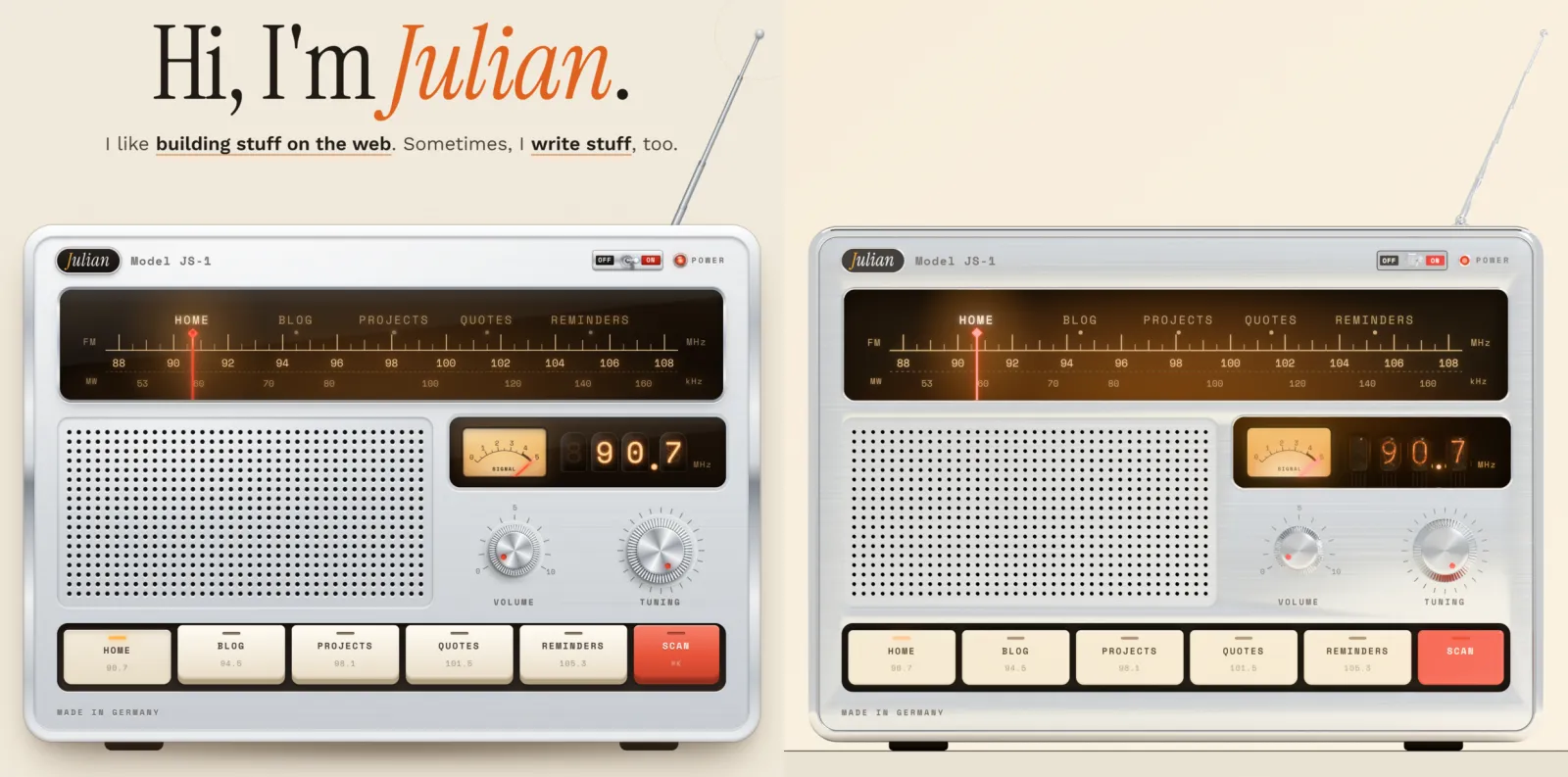
From there, it was the same refinement loop as with the website. Opus overlaid its renders with screenshots of the CSS version to check alignment, and fixed tiny seams in the faceplate on its own. My corrections were mostly about physical realism. On the website, the pressed "Home" key sits a little lower than the others, which fakes depth. Opus took that literally and moved the key down instead of pushing it into the case. The nixie tubes used a monospace font that no real nixie tube could ever produce, so Opus rebuilt the digits as bent wires, stacked in the same order as a real IN-14 tube.
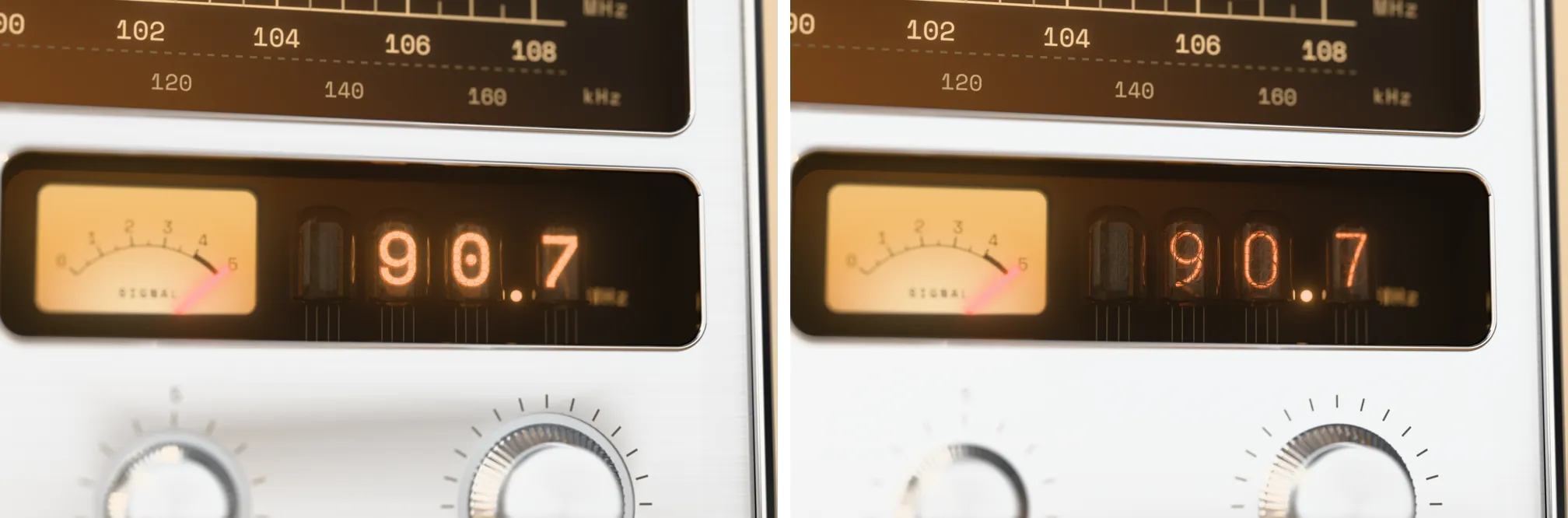
After almost four hours in a single session, this is how the Blender model (right) lines up with the CSS version (left):
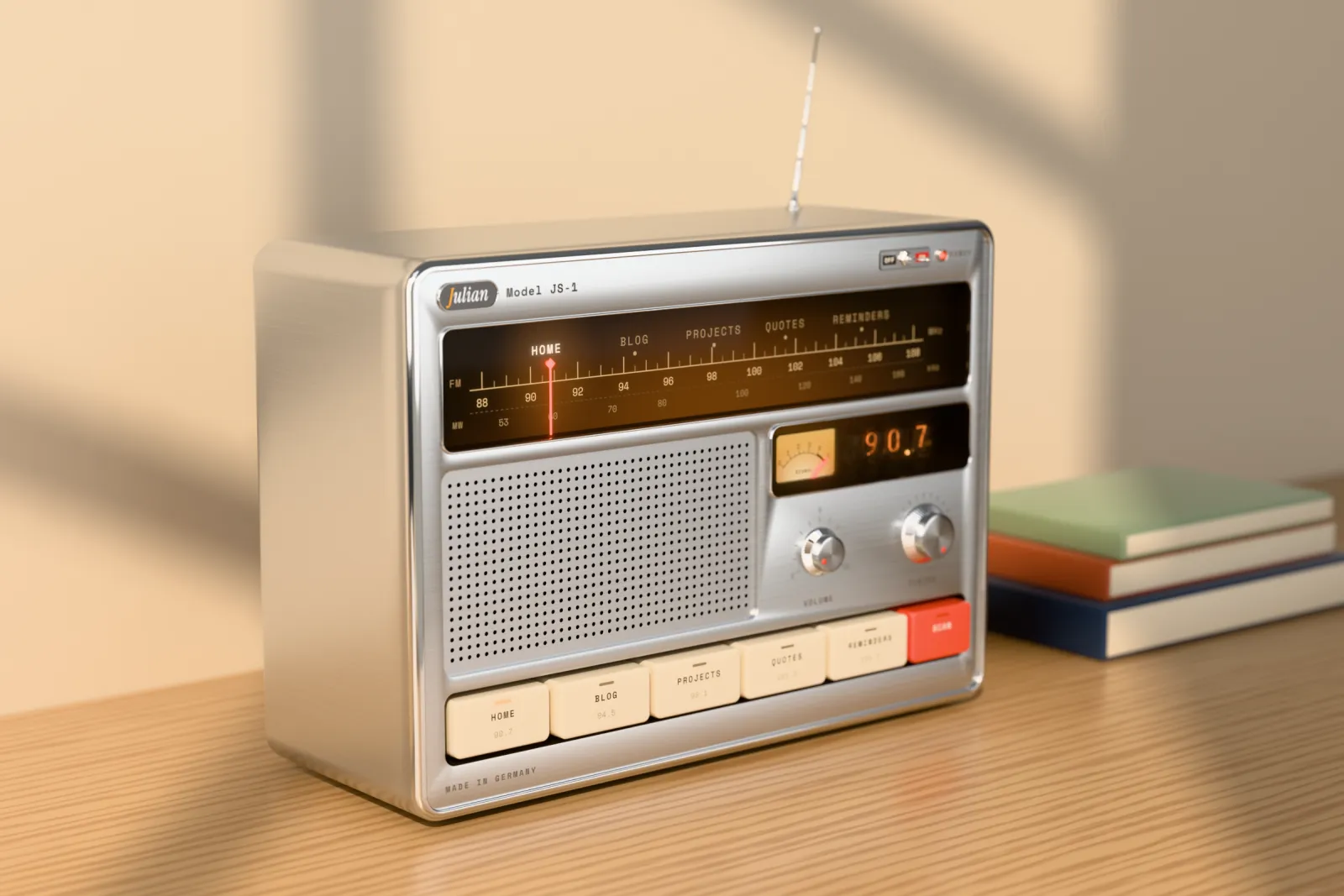
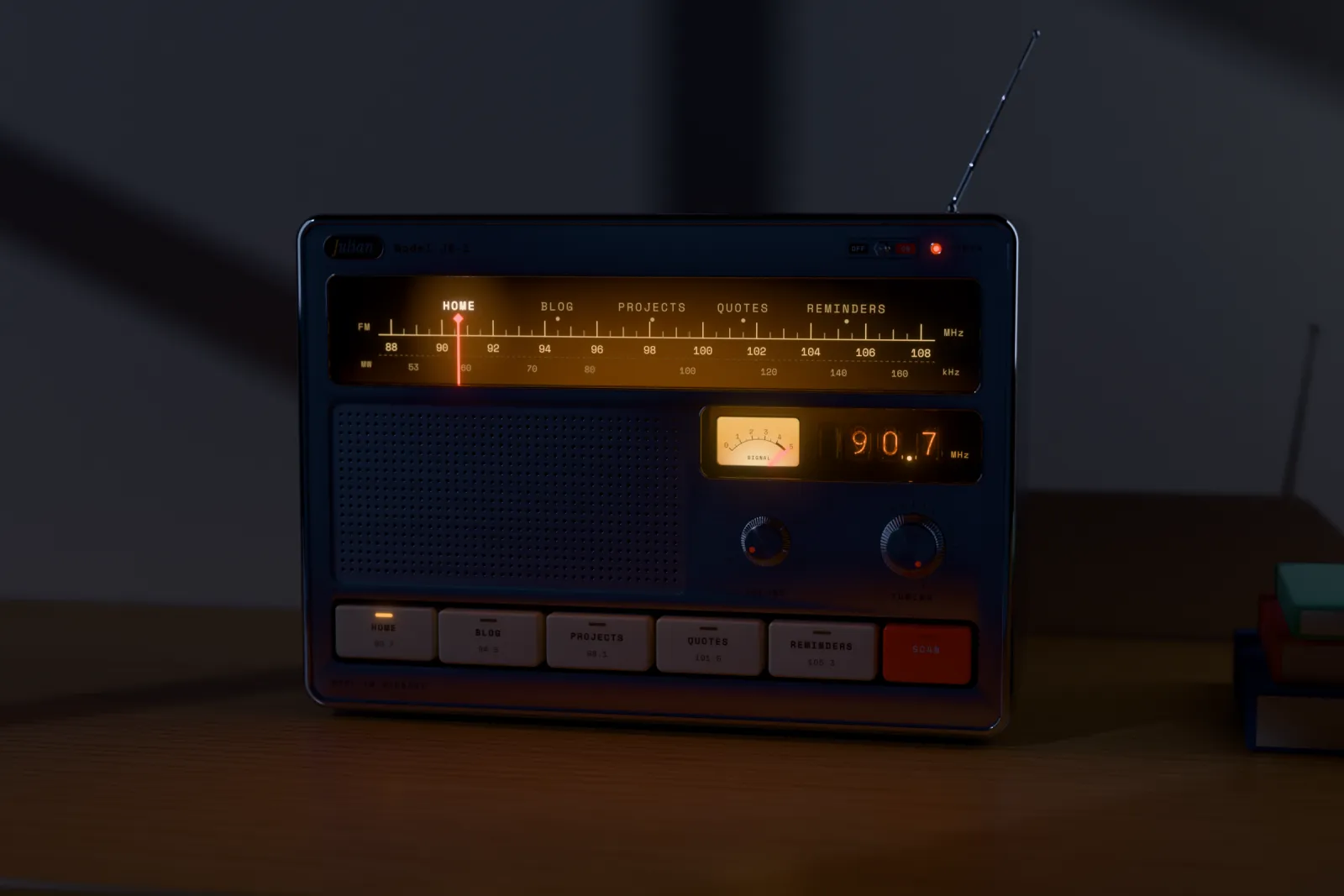
Put in a proper scene with an oak sideboard, a few books and some sun through the window, it looks really close to a product shot. And at night, the dial and the radio's lamps light up the room:
The playground
Renders are nice, but they're not much fun for visitors of this site. So the same evening, I had Opus build an interactive 3D playground with Three.js on top of the model.
The first version had one glaring issue (literally): from some angles, the chrome reflections got so bright that the whole screen turned white. Turns out the camera could get closer than the case was wide, so you could fly right into the radio. Most of my other feedback was again about making it behave like real hardware: keys shouldn't light up when you hover over them, key clicks should be audible even with the volume turned down, and one of the easter eggs didn't look great on the first try, so that had to be reworked.
Over the next few sessions, I worked on more details. There's spatial audio now, where every part (the speaker, each key, the power switch) is its own sound source, the sound gets muffled when you look at the radio from behind, and there's a bit of room reverb. There's a day and night mode with a slowly drifting sky, stars and a crescent moon.
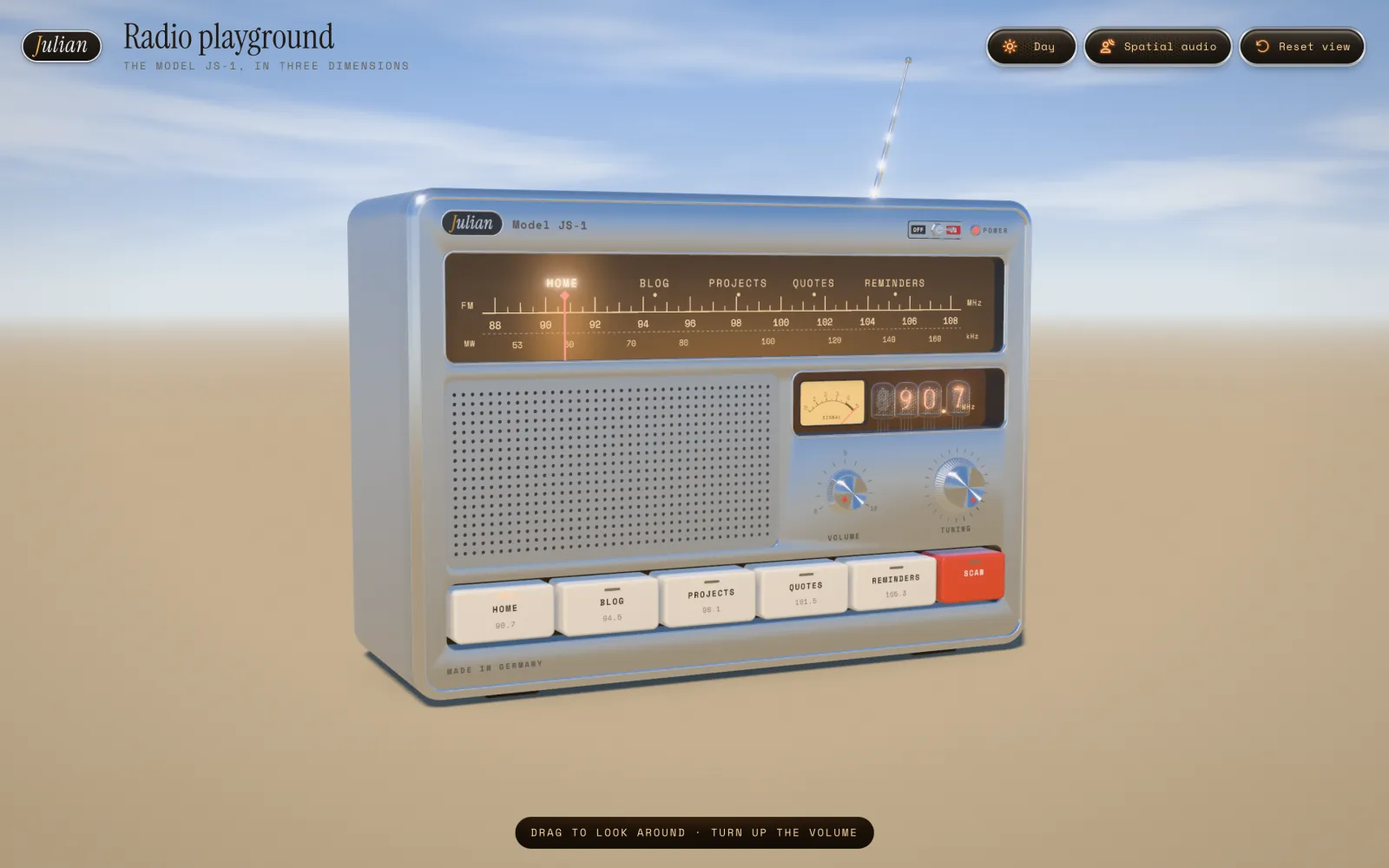
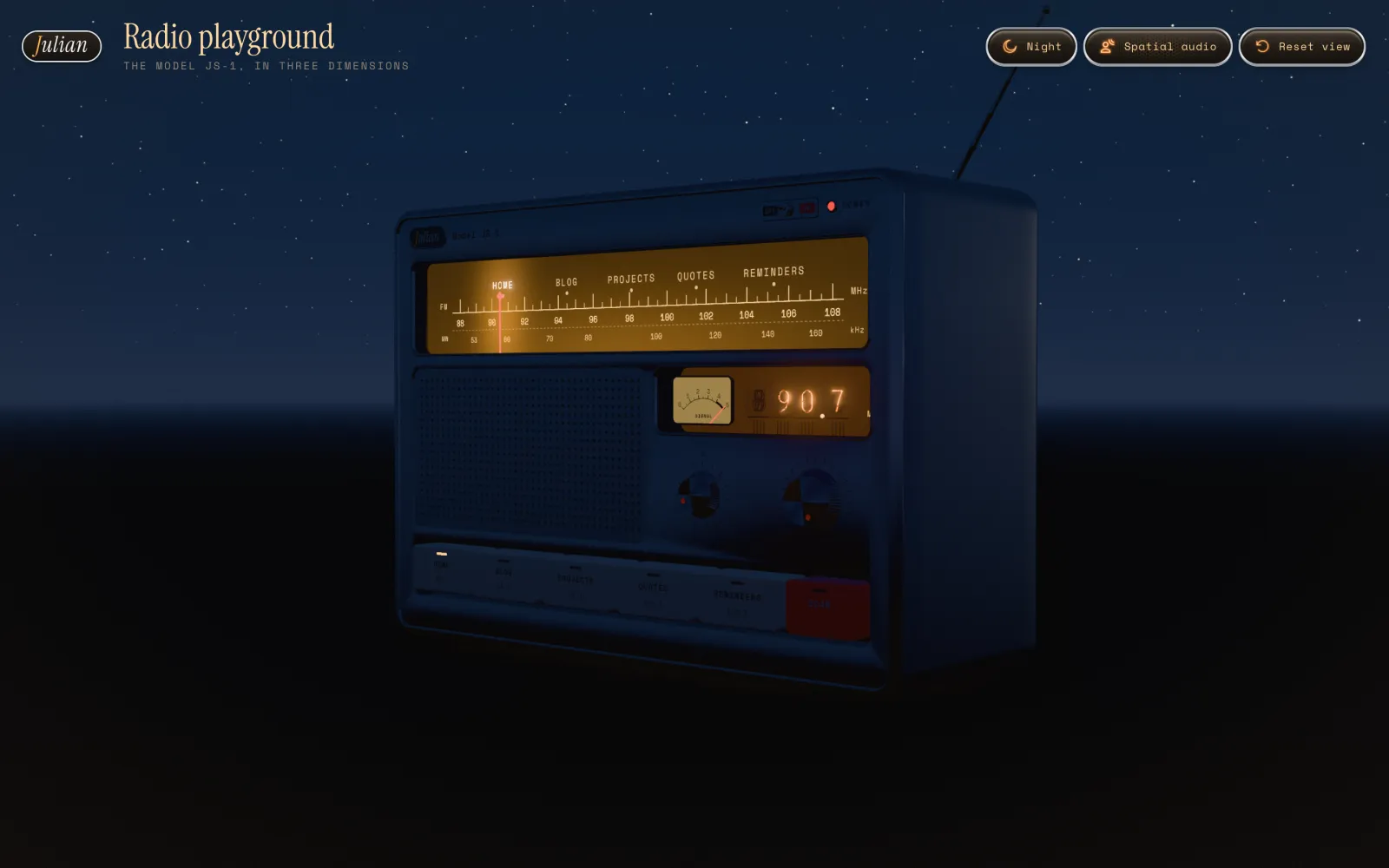
My favorite part is the transition from the 2D to the 3D version. Click "Try it in 3D" below the radio on the home page, and the page crossfades into the playground while the camera swings around the radio and it powers on. Because the model was generated from the CSS radio's measurements, the 3D front face matches the 2D one, and since both radios share the same sound engine, whatever station is playing keeps playing.
You can try it yourself here.
How far can I push this?
The previous stills from Blender were cool, but I wondered if I could create a high-end animated video with this.
Rendering a single still on my trusty old M1 MacBook Pro took 3 to 6 minutes. Even a 10-second clip in 4K at that quality would've kept my laptop busy for something like 32 to 76 hours. So I had Opus research options for cloud-based Blender rendering, and then let it rent a box with a capable GPU on RunPod through their MCP server.
Both the RTX 4090 and 5090 were out of stock, so the best alternative was an RTX PRO 6000 Blackwell with 96 GB of VRAM (probably overkill) for $2.09/h instead. Opus set up the pod, installed Blender and rendered some test stills. They only took 7 to 9 seconds each, compared to 3 to 6 minutes on my Mac.
Then I described the video I had in mind:
Fade in from black. The Radio is off, but fully visible from the 'day 4k still' angle. The power switch is turned on (radio lights come up, antenna extends), volume is turned up from 0 to 6, the home channel starts playing. The tuner knob is turned slowly to the right and stops for a short amount of time on each channel. The camera is panned from left to right during this. The light slowly transitions from day to night. The final stop is the 'Reminders' channel, ending the pan and in the full night. The camera moves towards the radio, zooming in on the nixie tubes and signal meter (reminders channel still playing). Finally, the radio is turned off, tubes, lights and music go out, fade to black.
[...]
Make it look smooth and stunning. Render it in 4k, 30fps.
To animate it, Opus ported the rig and the state machine of the Three.js playground into Blender, so the knobs, keys, antenna and needles move exactly like they do on the website. For the soundtrack, I had it play the video's action sequence in the actual playground, with the same camera movement, and record what came out.
A cheap low-res preview caught two bugs before the more expensive high-res render: the preset keys clicked too late, and the volume knob never turned. I went with 1440p instead of 4K, because no multi-GPU machines were available and 4K would've taken more than twice as long. The full render took 2 hours 26 minutes for 1290 frames, and when it was done, Opus encoded the video on the pod, downloaded it and stopped the pod, just like I asked it to.
The opening seconds took two more rounds of refinement until I was happy with them. Opus only re-rendered the first 300 frames each time and stitched them onto the existing video without a visible seam.
All in all, the GPU time for all three versions cost me just shy of $15. That could've been even less if I had used the pod's running time more efficiently. Here's the result (sound on!):
Why stop here?
And then I went a little crazy and forked the Blender project to turn the radio into a 3D-printable kit. Opus scaled it down so the case fits on the print bed in one piece.
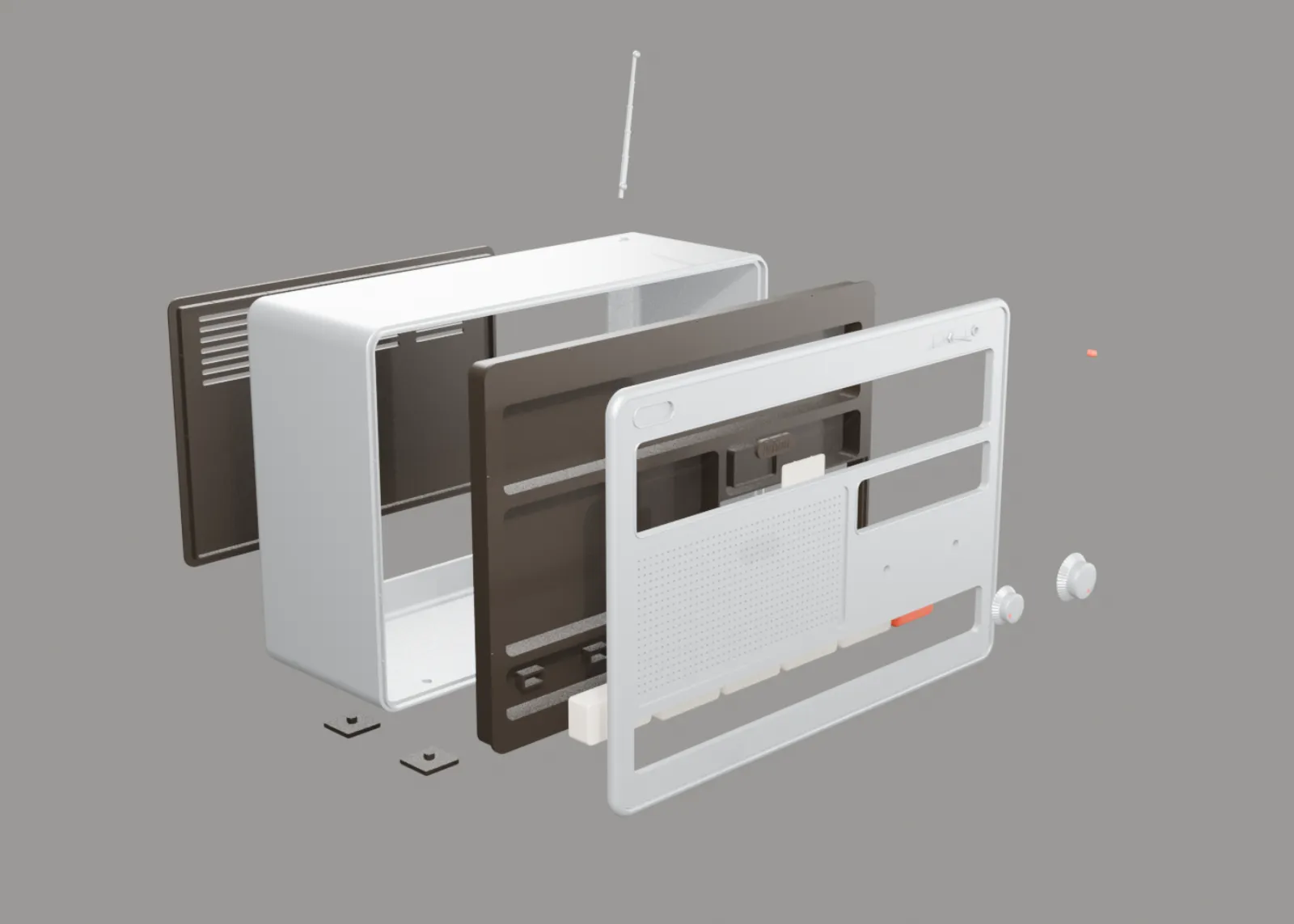
I plan to print it on my Bambu Lab printer eventually. I'm not sure how that will go, because the real world tends to bring way more unforeseen challenges than the digital one.
Going live
The site currently runs on my own Dokploy VPS, so I let Opus handle deployments through the Dokploy API with a custom skill, which made that part work pretty well.
The repo also needed some cleanup by then, mostly because of the Blender files and renders. Those moved to Git LFS, which deploys skip, and Dokploy now ignores pushes that only touch the radio files. That brought the build context down from 161 MB to 8.7 MB.
There were also some less glamorous moments: a new blur-in animation I added later on crashed the server-side rendering (SSR), which took the whole preview site down. After the hotfix, I asked Opus to make sure SSR failures can't break the site again. Now the SSR runs in a supervised process (as it should have from the start), pages fall back to client-side rendering if it doesn't respond in time, and there's a new test that renders every page through the production bundle, which catches this whole class of bugs beforehand.
For performance, I asked for a Lighthouse benchmark and a plan for improvements. Desktop scores were at 99 to 100 already, mobile was at 85 to 97 for most pages. Opus found that Cloudflare didn't cache any HTML, even though the server allowed it. So Opus set up a cache rule for the live site via the Cloudflare MCP server (with an exception for Inertia's JSON requests), a cache purge after every deploy, and longer caching for audio and images. A fresh run afterwards put desktop at 100 across the board and mobile at 94 to 98 for the same pages. The 3D playground is the exception at 73 to 84 on mobile, since it has to load and render a whole WebGL scene.
Letting an agent operate my server, my Cloudflare setup and a GPU box billed by the hour felt a little scary at first. But I always kept a close eye on resource usage and spend, and this is a non-critical project on my own server, without any accessible personal data. So I still felt in control the whole time.
Conclusions
This project made me explore the capabilities of frontier AI in a completely different way than I ever have before. I realized that basically everything that you can envision on the web and in other technologies is now available to you at your fingertips. I mean, if I had expert-level skills in every area, from web design and sound design to 3D modeling, game dev and DevOps, I could've hand-made each thing myself. But even then, it would probably have taken weeks or months. And I'd say that I still gained a lot of knowledge in things I didn't know before by being curious about the approach the agent took, asking questions and reading the code.
This is the golden age for generalists and builders with a vision. As long as you have a goal in mind, good taste, technical knowledge and a way for your agent to verify its results, you can create basically anything now.